

Download Sketch Find and Replace – Free Text Replacement Tool for Sketch
Overview
Sketch Find and Replace is a lightweight, free utility designed specifically for designers who work with Sketch on a daily basis. If you’ve ever spent valuable time scrolling through dozens of layers just to locate a single piece of text, you’ll understand why this tool has quickly become a must‑have in many design pipelines. By integrating directly into Sketch, the app eliminates the need for manual copy‑and‑paste or cumbersome third‑party scripts. Instead, it offers a clean, intuitive interface where you can define a search string and a replacement string, then apply the change across artboards, symbols, or even hidden layers with a single click. The result is a smoother workflow, fewer errors, and more time to focus on creative decisions rather than repetitive text edits. Because it’s completely free, Sketch Find and Replace also serves as an accessible entry point for freelancers, agencies, and design teams of any size. Its security model respects Sketch’s sandboxed environment, ensuring that your design files remain untouched by external processes. In short, this tool transforms what used to be a tedious chore into a quick, reliable operation, making it an essential addition to any Sketch‑based toolkit.
Key Features
- Batch Text Replacement: Replace text across multiple layers, symbols, and pages in one go.
- Layer‑type Awareness: Works with text layers, shape‑based text, and hidden layers without breaking layer hierarchy.
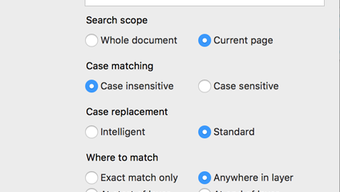
- Case‑Sensitive & Whole‑Word Options: Fine‑tune your search to match exact casing or whole words only.
- Live Preview: See a preview of the changes before committing, reducing the risk of unintended edits.
- Undo Support: All replacements are fully undoable via Sketch’s native undo stack.
- Zero‑Cost Licensing: Completely free for personal and commercial use, with no hidden fees.
- Secure Integration: Runs inside Sketch’s plugin sandbox, keeping your design files safe.
- Automatic Updates: The app checks for updates on launch, ensuring you always have the latest features and bug fixes.
These features collectively address the most common pain points designers face when editing repetitive text. For example, a branding project that requires updating a product name across dozens of screens can be completed in seconds rather than hours. The live preview function adds an extra layer of confidence, especially when dealing with complex symbol structures. Moreover, because the plugin respects Sketch’s native undo system, you can experiment without fear of permanently breaking your layout. The free licensing model also means that teams can roll out the tool across the organization without worrying about budget constraints, making it an ideal solution for both solo freelancers and large design departments.
Installation, Usage & Compatibility
Installing Sketch Find and Replace is straightforward. First, download the installer package from the official website. The file is a standard .sketchplugin bundle, which you can double‑click to add to Sketch’s plugin directory. Sketch will prompt you to confirm the installation; once approved, the plugin appears under the Plugins menu.
Step‑by‑step usage:
- Open the Sketch file you wish to edit.
- Navigate to Plugins → Sketch Find and Replace → Open.
- Enter the text you want to find in the “Search” field.
- Enter the replacement text in the “Replace with” field.
- Choose optional filters (case‑sensitive, whole word, specific pages or symbols).
- Click “Preview” to see which layers will be affected.
- If satisfied, click “Replace All”. The changes are applied instantly and are undoable.
Compatibility: Sketch Find and Replace works with Sketch version 50.0 and newer on macOS 10.15 (Catalina) through macOS 14 (Sonoma). The plugin leverages Sketch’s modern JavaScript API, ensuring smooth operation on both Intel and Apple Silicon Macs. While the tool is built for macOS, the underlying concept can be replicated on Windows or Linux using alternative design tools, but this particular plugin is exclusive to the macOS Sketch environment.
Because the plugin lives inside Sketch’s sandbox, it does not require additional permissions or external runtime dependencies. Updates are delivered via Sketch’s plugin manager; you’ll receive a notification when a new version is available, and a single click will replace the old bundle with the newest release. This seamless update process ensures you benefit from performance improvements and new features without manual intervention.
Pros, Cons, FAQ & Conclusion
Pros
- Free for both personal and commercial use.
- Batch replacement saves hours on large projects.
- Live preview reduces risk of accidental changes.
- Fully integrates with Sketch’s undo system.
- Secure, sandboxed execution protects design files.
- Regular automatic updates keep the tool current.
Cons
- Only available for macOS Sketch; no Windows version.
- Limited to text layers—does not modify raster‑based text.
- Interface is simple, which may feel basic for power users seeking scripting capabilities.
Frequently Asked Questions
Is Sketch Find and Replace really free?
Yes, the plugin is completely free for both personal and commercial projects. There are no hidden fees, licensing costs, or subscription requirements.
Can I undo a replacement if I make a mistake?
Absolutely. All replacements are recorded in Sketch’s native undo stack, so you can press ⌘+Z (or use the Edit → Undo menu) to revert any changes instantly.
Does the plugin work with symbols and nested layers?
Yes. Sketch Find and Replace scans symbols, nested groups, and hidden layers, applying replacements wherever the target text appears.
What versions of Sketch are supported?
The plugin requires Sketch 50.0 or newer and runs on macOS 10.15 (Catalina) through macOS 14 (Sonoma), supporting both Intel and Apple Silicon hardware.
How do I get updates for Sketch Find and Replace?
Updates are delivered through Sketch’s plugin manager. When a new version is released, Sketch will display a notification, and you can update with a single click.
Conclusion & Call to Action
For designers who spend any amount of time managing text across complex Sketch files, Sketch Find and Replace offers a simple, secure, and completely free solution. Its batch replacement capabilities, live preview, and seamless undo integration make it a practical time‑saver, while the lack of cost removes any barrier to adoption. Even though it’s limited to macOS, the plugin’s reliability and ease of use more than compensate for the platform restriction. If you’re looking to streamline your workflow and eliminate repetitive copy‑and‑paste tasks, download Sketch Find and Replace today and experience a smoother, more efficient design process.
Sketch Find and Replace delivers on its promise of quick, reliable text editing within Sketch. The free price tag, combined with solid feature coverage, makes it an excellent addition to any designer’s toolbox. Minor limitations, such as lack of Windows support, keep the rating from being perfect, but overall it’s a standout utility that significantly reduces tedious manual work.







